
In this article
Adding an None of the above option to a question
Adding a None of the above option to a multiple-answer Choice question allows respondents to indicate that none of the available answer options apply to them.
When a respondent selects None of the above, any other selected answer options will be cleared.
1. Add a None of the above option
To add a None of the above option to your multiple-answer Choice question:
- Click the question to open the editor.
- Click the Add ‘none of the above option’ button below your list of answer options.
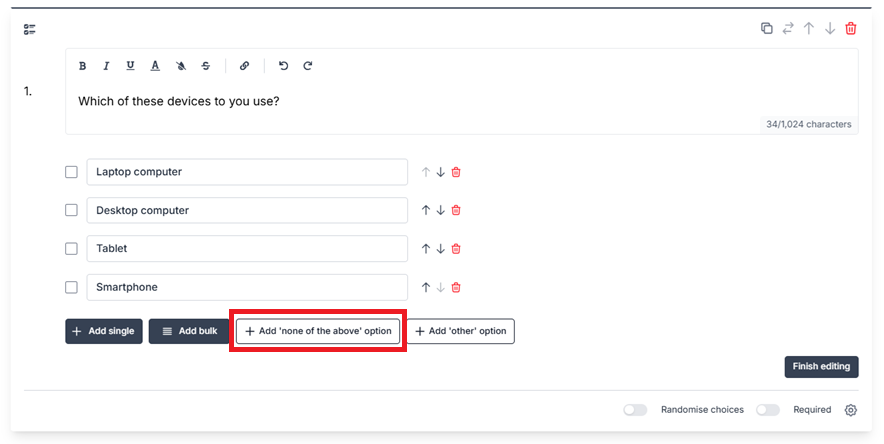
2. Edit the text for your None of the above option (optional)
To edit the text for your None of the above option:
- Click into the None of the above option text field.
- Replace the default text.
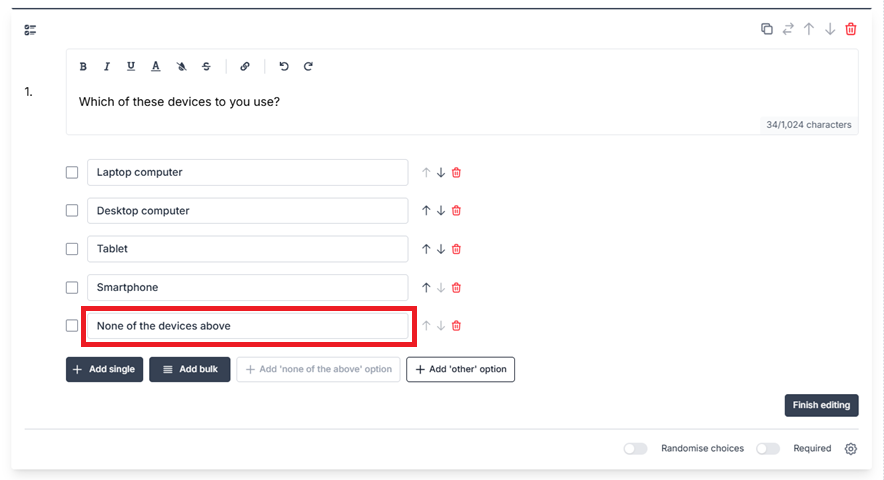
Note: the default None of the above option text is not translated if you choose a Display language other than English. You should edit the None of the above option text to your desired language.
3. Finish editing
To complete the task:
- Click Finish editing.
- View the question on your builder. The None of the above option will be displayed with your answer options.

What your respondents will see
Respondents will see the None of the above option as part of your list of answer options.
If a respondent selects None of the above, any other selected answer options will be cleared.
If a respondent selects another answer option after selecting None of the above, the None of the above option will be cleared.

If you have chosen to randomise your answer options, the None of the above option will always be pinned to the bottom, unless an Other option is used.
Analysing questions with an None of the above option
When a respondent selects your None of the above option, this will be counted with your quantitative results and displayed in your charts.
In your Responses downloads, None of the above will be included as one of the answer options for the question.
In PDF and XLSX Summaries, None of the above will be shown with the other answer options in the Choice question results.