
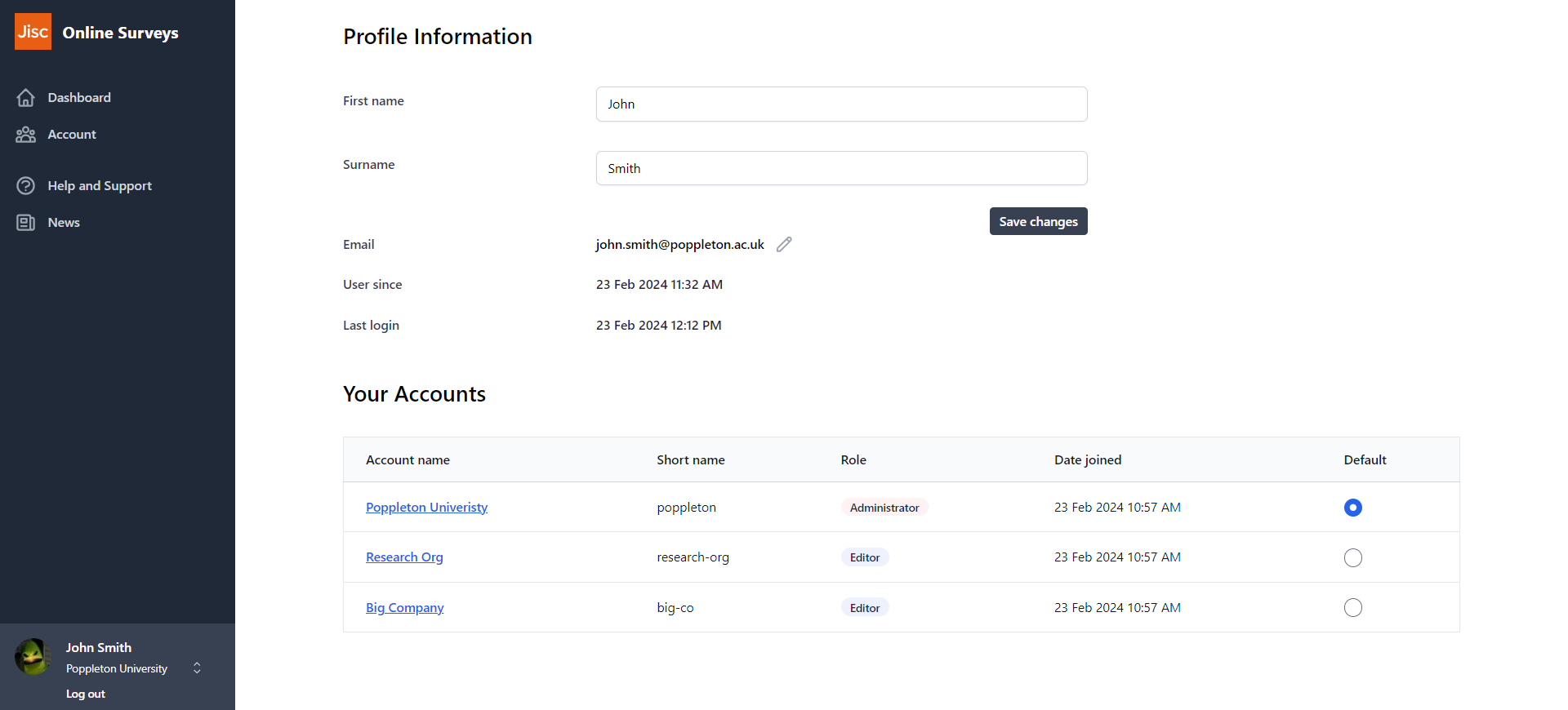
If you have a user profile in more than one account, you will automatically view the Dashboard of the oldest account when you log in. But you can change this by setting a default Dashboard.
To change your default Dashboard:
- Go to your Profile page by clicking your name/email address at the bottom of the sidebar menu.
- Select the radio button next to the account you want to set as your default.
Further help and support
Writing and formatting question text
This help page details how write and format question text.
Read MoreWhy data protection matters when collecting survey responses
In today’s data-driven world, surveys are a cornerstone of data insights and research. They provide valuable understanding into behaviours, opinions, and trends that inform decision-making across education and research. However, with this power comes great responsibility—specifically, the responsibility to protect the data collected from respondents.
Read MoreWhat we’ve delivered in 2025 (so far…)
So far in 2025, we’ve introduced 40+ new features and improvements. These are the highlights.
Read MoreViewing individual responses
This help page details how to find and view individual responses to your survey.
Read MoreViewing a user’s survey permissions
This help page explains how to view an individual user's survey permissions.
Read MoreView unsubscribed emails in your respondent list
Our new feature allows you to view which respondents in your list have opted out of receiving survey invitations.
Read MoreUsing pre-population
This help page explains how you can pre-populate answers to questions in your survey by uploading those answers to your respondent list.
Read MoreUsing Online Surveys for Vitae’s Research Culture Landscape Survey pilot
This help page contains guidance for running Vitae's Research Culture Landscape Survey pilot.
Read More